If your Fiverr gig is not ranking, not showing up in search, or simply not getting orders, you are not alone. Many freelancers face this exact problem. In this article, we are going to cover Fiverr analytics in depth, including the value of impressions and clicks, and we will also answer one of the most common questions: should you delete your gig or just update it?
On top of that, we will walk through a gig update so you can see exactly which sections to change and to what extent. By the end, you will also learn how to scale up your Fiverr business and stay on the platform for the long term.
Why Fiverr Gig Rankings Drop
Before jumping into fixes, it is important to understand why a gig loses its ranking in the first place. There are four main reasons:
1. No orders coming in. If your gig is sitting idle with zero orders for a long period, Fiverr’s algorithm tends to reduce its visibility. A pattern that many experienced sellers have observed consistently.
2. Order cancellations. When orders get cancelled repeatedly, it signals a problem to the algorithm and hurts your gig’s position.
3. Negative reviews. If a buyer is dissatisfied and leaves a bad review, your gig ranking takes a direct hit.
4. Fiverr algorithm changes. Fiverr updates its algorithm regularly. If you are not staying informed about these changes, your gig can drop even when everything else looks fine.
If a buyer is dissatisfied and leaves a bad review, your gig ranking takes a direct hit. Learning how to handle client communication for better reviews can help you avoid this situation before it happens.
Should You Delete or Update Your Gig?
The answer is almost always: update, do not delete. Deleting only makes sense in specific cases. If you used the wrong keywords from the start, if the gig violates Fiverr’s policies, or if the service is no longer relevant to what you offer or cannot realistically be optimized. Outside of these situations, updating is always the smarter move.
How to Update Your Fiverr Gig (Step-by-Step)
Here is a complete step-by-step breakdown of how to update your Fiverr gig from the dashboard.
Step 1: Go to My Business and Open Your Gigs
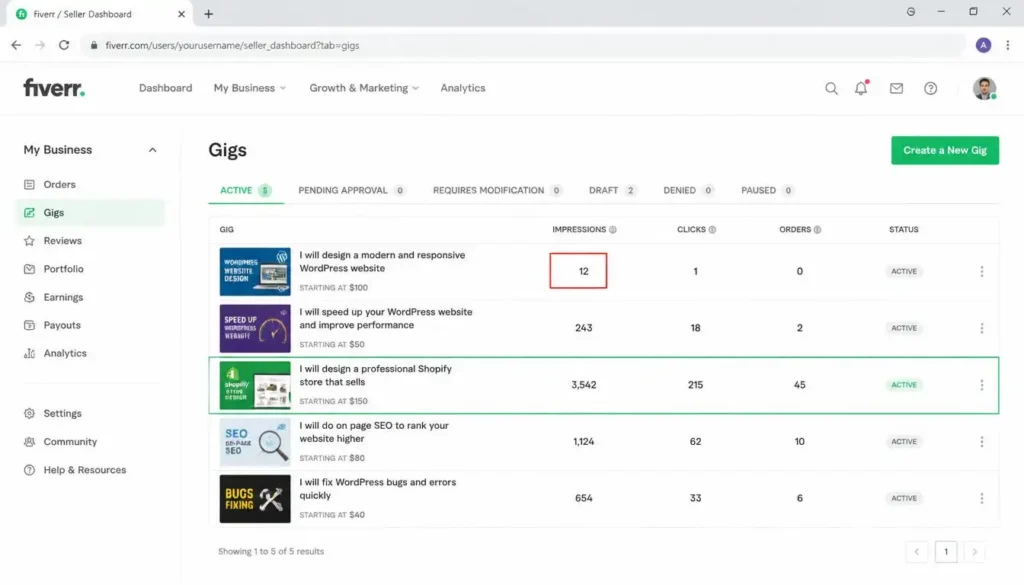
From the Fiverr dashboard, go to My Business and then click on Gigs. All your gigs, whether active, pending, in draft, denied, or approved, will appear here.
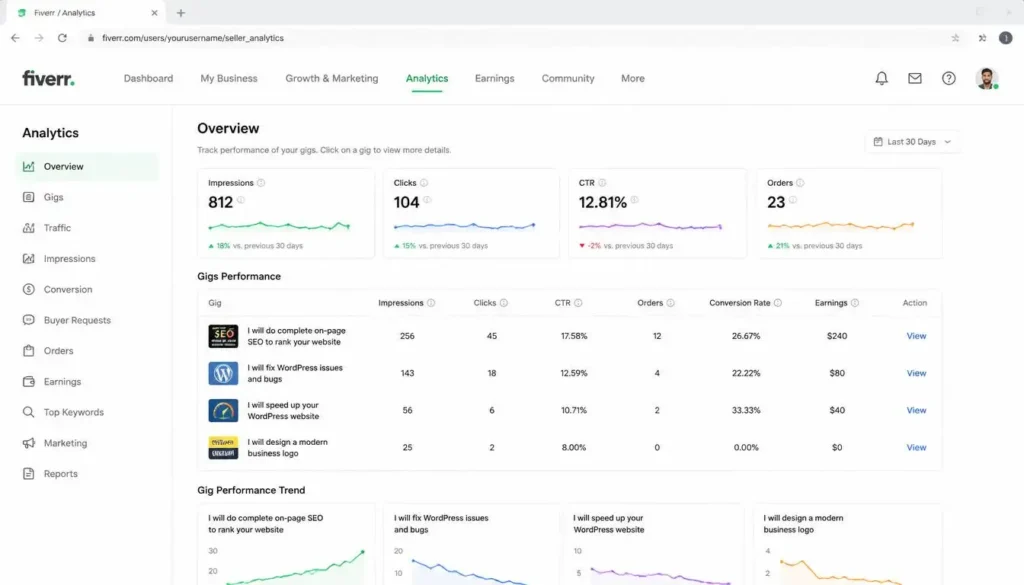
Look at the impressions on each gig. For example, if one of your gigs has significantly lower impressions than the others, say 20 or 30 compared to 200 or more, that is the gig that needs your attention first.
Click the three-dot menu next to that gig and select Edit.
Step 2: Fix the Gig Title
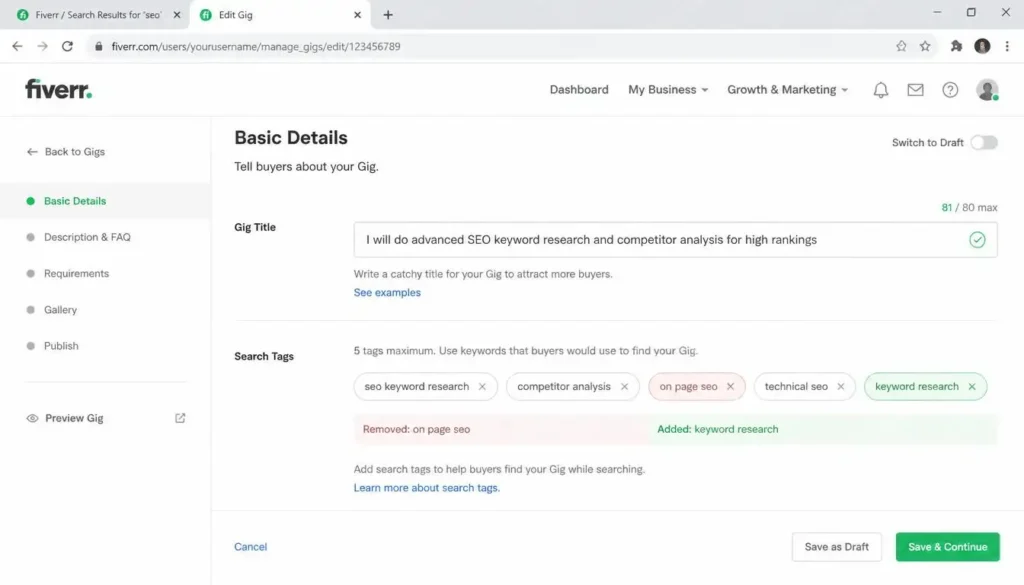
The rule for a gig title is simple. Your primary keyword must appear immediately after “I will do,” “I will build,” or “I will create.” After that, you can add one or two more supporting keywords. Do not stuff too many keywords into the title.
When optimizing, aim to change about 50% of your existing gig title.
For example, an old title like “I will provide DA guest backlinks guest post via fashion lifestyle travel guest post” was updated by replacing the keyword with a cleaner phrase: “guest posting service.” This makes it more readable and more focused.
Step 3: Refresh Your Gig Keywords (Tags)
After fixing the title, move to your keyword tags. You do not need to remove all of them. Remove at least two that are no longer relevant and replace them with fresh, better-performing keywords.
Use keyword research tools like Fiverr’s search bar, Google Keyword Planner, or Ubersuggest to find out which keywords are currently ranking well, and add those here.
Once done, save this page and move forward.
Step 4: Fix the Pricing Section
In the pricing section, make sure each package is focused on one niche only. If your gig is about travel guest posts, then your package titles should also reflect travel, not a mix of travel and fashion.
Each package title should use your relevant keywords. Having mismatched niche keywords in your packages is one of the reasons a gig underperforms.
Step 5: Optimize the Description and FAQs
The description heading and the first three to four lines are the most important part. This is where your primary keywords must appear.
Review your description periodically and update it when your keywords, services, or market trends change.
After updating your gig, give it 20 to 25 days before evaluating the results. Many experienced sellers report ranking changes taking this long, though Fiverr has never officially confirmed an exact timeframe.
In your description, follow this structure:
- The heading should contain your keywords
- The first few lines should address the buyer’s interest or their problem (their “pain point”)
- After that, present what you are offering
For the FAQs section, this is a goldmine for keyword usage. You can naturally include all your relevant keywords inside the questions and answers.
For example, if a question is “Do you accept orders in bulk?”, the answer does not have to be just “Yes.” A better answer would be: “Yes, I have more than 300 travel and fashion sites, so you can place orders in bulk to get fashion guest posts and travel guest posts.”
That one answer has naturally included multiple keywords. This approach can naturally include important keywords while still answering buyers’ questions.
Fill all available FAQ slots. Keep adding questions and answers until the limit is reached. However, make sure every question is purposeful and every answer includes relevant keywords. Do not create FAQs just to fill space.
Step 6: Fix the Requirements Section
Check your requirements section for any errors or copy-paste mistakes. If your gig is for a specific niche, all the requirements should reflect that niche.
For example, a common requirement section might include things like:
- Article must be 500 or more words
- Must be 100% unique with zero plagiarism
- Article should be about the niche as described
- If the writer writes the article, provide the topic idea, anchor text, URL of the target site, and any media assets
Review this section carefully and correct any content that is irrelevant to your niche.
Step 7: Update the Gallery (Gig Image)
The gallery section is very important. Your gig image is the very first thing that catches a buyer’s eye when they are scrolling through a page of 10 or 16 gigs.
A good gig image should have:
- Good color combinations
- Text that is easy to read at a glance
- No clutter or overstuffing
There is one detail that many freelancers miss: the file name of the image you upload. Name your image file after your keyword. If your gig is about travel guest posts, the image should be saved as “travel-guest-post.jpg” before uploading. If it is about SEO backlinks, the file name should be “seo-backlinks.jpg.”
If your gig allows supporting documents, consider uploading a PDF portfolio, sample work, case studies, or any information that helps buyers understand your service.
Once you save all sections, your gig is officially updated.
If your gig allows supporting documents, consider uploading a PDF portfolio or sample work. If you are just starting out, you can still build a freelance portfolio even without prior clients.
How to Continuously Improve Your Gig
Keep in mind that no gig is ever fully complete. There is always room for improvement. If you plan to update your gig every month, spend that month studying, learning new keywords, and understanding what is ranking. Then apply what you learn to the next update.
This approach of continuous learning and applying is what leads to real, steady growth.
How to Scale Up Your Fiverr Business
Once your gig starts getting orders, the next step is to grow the business. Here is how to do it smartly.
Create delivery templates. For every type of order, have a pre-designed delivery message ready so you are not writing from scratch each time.
Design follow-up messages. After delivering an order, having a follow-up message ready saves time and maintains a professional relationship with buyers.
Build a team. When the workload increases, having team members to assist means you can handle more orders without dropping quality.
Use tools. Find tools that help you complete tasks faster. Efficiency is key when scaling.
Raise prices gradually, not all at once. Do not jump from $10 to $50 or $90 overnight. If a package is at $10, move it to $15 first, then to $20 when you are consistently getting orders. Price increases should match the growth of your skills and expertise, not just your desire to earn more.
How to Stay on Fiverr for the Long Term
To build a long-term business on Fiverr, the most important thing is to keep your account safe. Never violate Fiverr’s Terms of Service or Community Guidelines. If your account is suspended, everything else becomes irrelevant.
Beyond account safety:
Stay in contact with previous clients. Your repeat buyers are your biggest asset. Keep the relationship alive.
Send seasonal promotions. When major events are coming up, for example the Olympics, sports-related guest post demand goes up. During Christmas, gift and lifestyle content demand increases. Use these windows to reach out to your previous buyers and offer relevant services.
Go deep into your niche. If you are in the technology space, do not try to cover everything. Go into SaaS. Then go into micro-niches within SaaS. Build specialized gigs for those sub-niches. This is where the real success lies.
The most important thing to remember: income and business growth come from long-term relationships and repeat buyers. Their trust is what builds a stable income, not one-time transactions.